
Establishing a seamless internet connection in open-field environments requires more than just standard hardware. For high-demand applications like site monitoring or rural connectivity, utilizing a wifi router outdoor simcard system is the most effective way to bridge the gap between cellular networks and local device requirements. This guide explores how to leverage specialized hardware to ensure your signal remains robust regardless of distance or obstacles.
Strategic Antenna Integration for Enhanced Reception
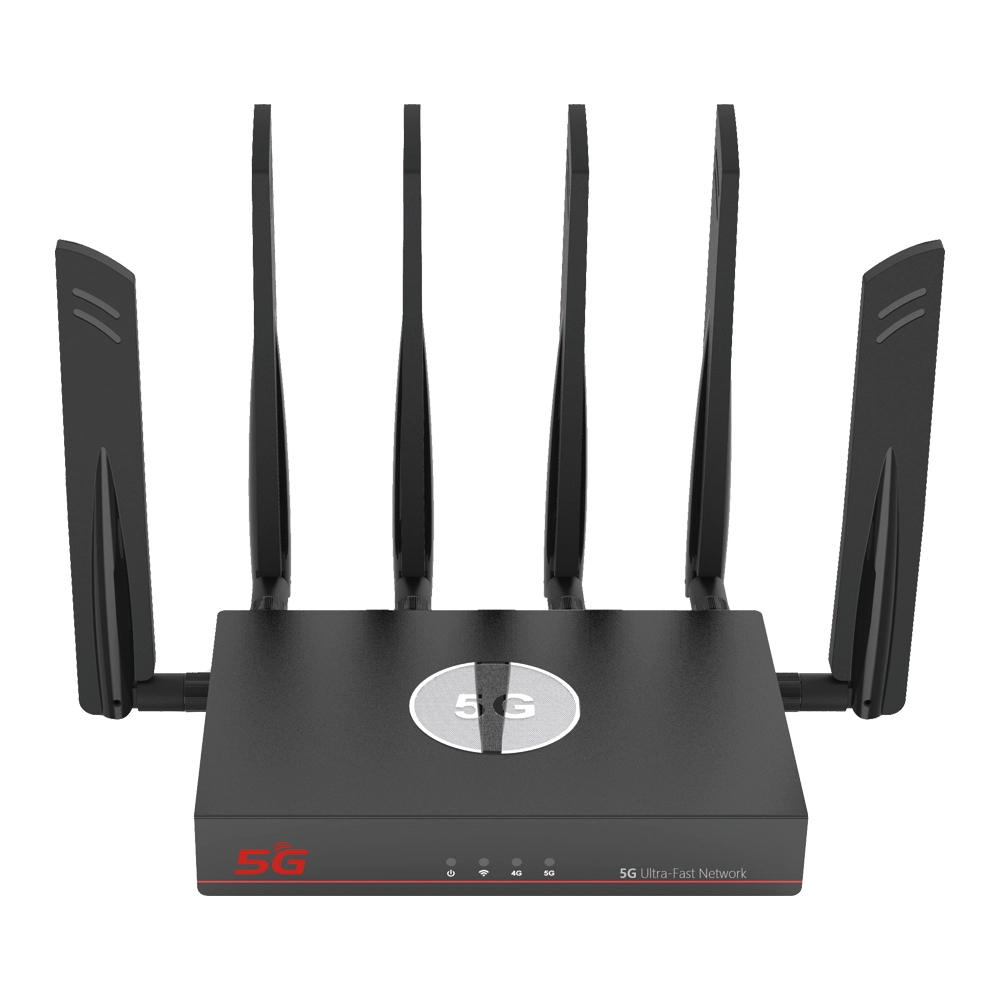
The defining feature of a professional wifi router with sim card slot and external antenna is the ability to bypass the physical limitations of internal receivers. To get the most out of your external hardware, follow these calibration steps:
- Impedance and Connection Security: Before powering on the device, ensure the external antennas are connected to the designated LTE ports. These are often labeled to distinguish them from WiFi antennas. A loose connection can lead to high VSWR (Voltage Standing Wave Ratio), which reduces efficiency and may heat the module.
- Height and Line-of-Sight: For an wifi router outdoor simcard, every meter of elevation reduces signal interference from the ground. Aim for a mounting position that provides a clear line-of-sight to the nearest cellular tower.
- Polarization Tuning: If your router utilizes multiple external antennas (MIMO technology), orient them at a 90-degree angle to each other (e.g., a “V” shape). This allows the device to capture signals from multiple planes, significantly increasing data throughput in “fringe” signal areas.
Optimizing the SIM Interface and Wireless Distribution
The heart of the system is the SIM card slot, which acts as the gateway to the 5G/LTE backbone. Proper software configuration ensures this data is distributed efficiently via WiFi.
- SIM Slot Protection: Ensure the SIM card is seated firmly before sealing the outdoor enclosure. In high-vibration environments, even a slight shift can cause a “SIM Not Detected” error, leading to avoidable downtime.
- Band Width Management: Access the Web UI and navigate to the Wireless settings. For long-distance outdoor WiFi coverage, select a 20MHz channel width. While 40MHz offers higher peak speeds, 20MHz provides better penetration and stability over long distances.
- Transmit Power Control: Always set the WiFi transmit power to the maximum allowed by local regulations to ensure the signal can reach mobile devices across the deployment site.
To help you understand the performance expectations of different antenna configurations, refer to the table below:
| Setup Type | Recommended Use | Coverage Advantage |
| Omnidirectional External | Mobile trailers or 360° sites | Uniform coverage in all directions; easy setup |
| High-Gain Directional | Fixed remote sites (Farms/Mines) | Exceptional distance; locks onto distant towers |
| MIMO (Multiple Antennas) | High-density data backhaul | Increased stability and higher download speeds |
| Extended Low-Loss Cabling | Indoor router with outdoor antenna | Keeps hardware protected while maximizing signal |
Ensuring Long-Term Link Resilience
An outdoor deployment is a “set and forget” project only if the internal logic of the router is tuned for resilience.
- ICMP Ping Check (Link Detection): Configure the router to ping a reliable public IP (like Google DNS) every 60 seconds. If the ping fails, the router will automatically re-initialize the LTE connection, ensuring that temporary carrier glitches don’t lead to permanent outages.
- Heat Management: While the wifi router with sim card slot and external antenna is built for rugged use, internal heat can still affect the SIM card’s longevity. Ensure the device is mounted in a way that allows for natural convection, even if it is housed in a protective IP-rated box.
- Secure Remote Access: Since these units are often in hard-to-reach locations, set up a secure DDNS or VPN tunnel. This allows you to check signal metrics and perform firmware updates without needing a ladder or specialized onsite equipment.
Outdoor Connectivity FAQ
1. Can I use longer cables to move my external antenna higher?
Yes, but be mindful of “cable loss.” Long coaxial cables can degrade the signal before it reaches the router. If you need more than 5-10 meters, use high-quality, low-loss LMR-400 cables or consider moving the router closer to the antenna and using a PoE (Power over Ethernet) cable for the data/power run instead.
2. Does a wifi router outdoor simcard support 5G and 4G simultaneously?
Most modern routers are “backward compatible.” They will prioritize a 5G signal for maximum speed but will seamlessly failover to 4G LTE if the 5G signal becomes unstable. This ensures your site never loses connection during network handovers.
3. Is it difficult to configure the APN for different international carriers?
Not at all. Most devices feature an “Auto-APN” database. However, if you are using a specialized industrial SIM card, you can manually input the APN, Username, and Password in the “Cellular WAN” section of the management interface.
4. How do I protect the external antenna connectors from rust?
While the router is waterproof, the exposed metal connectors (SMA/N-Type) can oxidize over time. We recommend wrapping the connection points in self-amalgamating waterproof tape or using dedicated weatherproofing kits provided by the manufacturer.
5. Can this setup handle multiple IP cameras simultaneously?
Yes. A professional wifi router with sim card slot and external antenna is designed for high-concurrency. By using the external antennas to stabilize the “uplink,” you can reliably stream multiple high-definition video feeds back to your central control room.
6. What happens if the SIM card hits its data limit?
You can configure a “Data Limit” in the router settings. Once the limit is reached, the router can be set to either disconnect or simply send an alert via the system log, preventing excessive overage charges from your carrier.


What can we do for you?